Methods
VLab4Mic exposes two high-level functions that cover the main simulation workflows.
image_vsample — Create and Image a Virtual Sample
image_vsample creates a virtual sample from a structural model, applies fluorescent labelling, and generates imaging simulations across one or more microscopy modalities.
The function returns:
images— dictionary of simulated images with noise, keyed by modality namenoiseless— dictionary of noiseless simulated images, keyed by modality nameexperiment— object containing all modules used to generate the simulation
Basic Usage
Running with default parameters creates a virtual sample with a default structure and probe:
from vlab4mic.experiments import image_vsample

images, noiseless, experiment = image_vsample(run_simulation=True)
Parameterized Usage
Specify each aspect of the virtual sample and imaging:
from vlab4mic.experiments import image_vsample

modalities = ["Widefield", "Confocal", "AiryScan", "STED", "SMLM"]

images, noiseless, experiment = image_vsample(
    structure="7R5K",              # PDB ID for a Nuclear Pore Complex
    probe_template="Antibody",     # Probe template
    probe_target_type="Sequence",
    probe_target_value="ELAVGSL",  # Epitope sequence
    number_of_particles=10,
    random_rotations=True,
    rotation_angles=None,
    multimodal=modalities,
    STED={"exp_time": 0.01},       # Modality-specific parameters
    expansion_factor=1,            # Scale factor for structure coordinates
    random_seed=42,                # Set for reproducibility
    run_simulation=True,
    clear_experiment=True,
)
Using Structure-Specific Probe Templates
For common structures, pre-configured probe templates are available:
from vlab4mic.experiments import image_vsample

images, noiseless, experiment = image_vsample(
    structure="7R5K",
    probe_templates=["NPC_Nup96_Cterminal_direct"],
    run_simulation=True,
    clear_experiment=True,
)
See the Templates page for the full list of available probes.
Indirect Labelling (Primary + Secondary Probe)
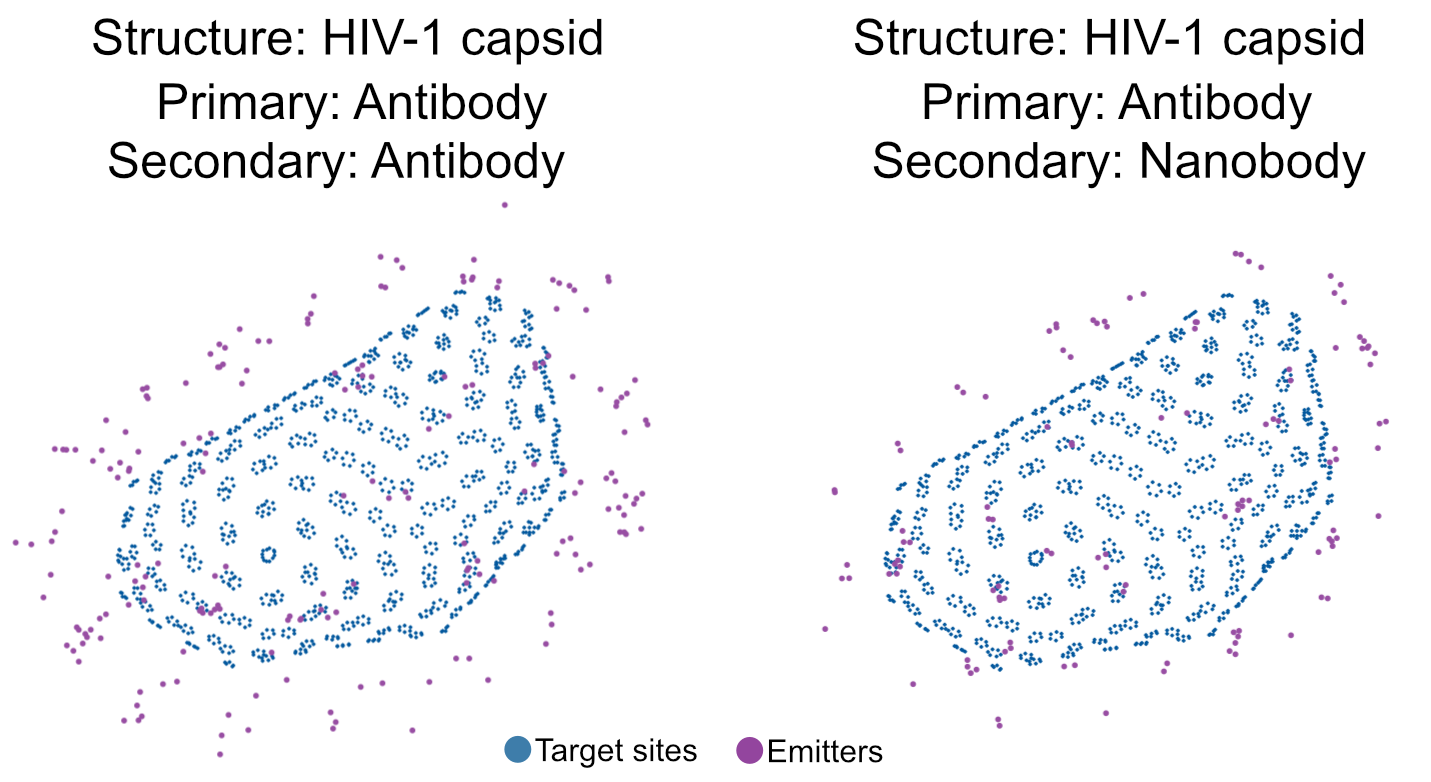
VLab4Mic supports modelling of conventional primary and secondary probe labelling strategy. In a first step, primary probes are placed on the target structure. Once placed, an epitope site within the probe model will define the spatial location for a secondary probe. Then the secondary probes are placed on the already positioned primary probes.
When secondary labelling is used, only the fluorophores on the secondary antibodies are included in the simulation.
Example use with high-level function image_vsample:
from vlab4mic.experiments import image_vsample
import matplotlib.pyplot as plt
random_seed = 1

# Define parameters for the primary probe, such as the probe template to use.
# Further parameters can be specified; otherwise, defaults are taken from the
# probe template specified.

primary = dict(
    probe_template = "Antibody",
    probe_name="Primary-HIV",
    probe_target_type = "Sequence",
    probe_target_value = "SPRTLNA",
)

secondary_antibody = dict(
    probe_template = "Antibody",
    probe_name="Secondary-antibody",
    probe_target_type = "Primary",
    probe_target_value = "Primary-HIV",
    probe_DoL=4,
)
modalities = ["STED", "SMLM",]
image_outputs1, image_outputs_noiseless1, experiment1 = image_vsample(
    structure = "3J3Y",
    primary_probe = primary,
    secondary_probe = secondary_antibody,
    multimodal=modalities,
    clear_experiment=True,
    run_simulation=True,
    random_seed=random_seed
)
# visualise the position of fluorophores relative to the epitope sites
fig = plt.figure(figsize=[10,15])
ax1 = fig.add_subplot(1, 1, 1, projection="3d")
target_colour="#01579D"
experiment1.particle.gen_axis_plot(
    with_sources=True,
    axis_object=ax1,
    target_colour=target_colour,
    source_plotsize=2,
    emitter_plotsize=10,
    source_plotalpha=1,
    xlim=[-200,800],
    ylim=[0,1200],
    zlim=[0,700],
    view_init=[90,0,0])
The secondary probe model can be changed in an initialised experiment by removing the probes and clearing the labelled structure.
Note: adding primary and secondary probes with the add_probe method requires the flag as_primary to be set as True for the primary probe.
The rest of the parameters can be passed as keyword arguments.
secondary_nanobody = dict(
    probe_template = "Nanobody",
    probe_name="Secondary-nanobody",
    probe_target_type = "Primary",
    probe_target_value = "Primary-HIV",
    probe_DoL=2,
)
experiment1.remove_probes()
experiment1.clear_labelled_structure()
experiment1.add_probe(as_primary=True, **primary)
experiment1.add_probe(as_primary=False, **secondary_nanobody)
experiment1.build(modules=["particle", "coordinate_field", "imager"])
image_outputs2, noiseless2 = experiment1.run_simulation()

# visualisation can be done similar to example above
Displaying Simulation Results
import matplotlib.pyplot as plt

nmods = len(modalities)
fig, axs = plt.subplots(1, nmods)
for i, mod in enumerate(modalities):
    axs[i].imshow(images[mod][0], cmap="magma")
    axs[i].set_title(mod)
plt.show()
run_parameter_sweep — Sweep Over Parameter Combinations
run_parameter_sweep systematically generates and analyses simulations over combinations of parameter values.
from vlab4mic.sweep_generator import run_parameter_sweep

sweep_gen = run_parameter_sweep(
    output_name="my_sweep",
    return_generator=True,
    save_sweep_images=True,
    save_analysis_results=True,
    run_analysis=True,
)
Specifying Sweep Parameters
Pass parameter values as a list of explicit values, or as a tuple (min, max, nsteps) to generate linearly spaced values:
from vlab4mic.sweep_generator import run_parameter_sweep

sweep_gen = run_parameter_sweep(
    structures=["7R5K"],
    probe_templates=["NPC_Nup96_Cterminal_direct"],
    sweep_repetitions=20,
    # Parameters to sweep
    labelling_efficiency=(0, 1, 5),              # 5 values from 0 to 1
    structural_integrity=(0, 1, 5),              # 5 values from 0 to 1
    structural_integrity_small_cluster=[300],    # Single value
    structural_integrity_large_cluster=[600],    # Single value
    exp_time=[0.001, 0.01],                      # Two values
    # Output options
    output_name="my_sweep",
    return_generator=True,
    save_sweep_images=True,
    save_analysis_results=True,
    run_analysis=True,
    random_seed=42,                              # Reproducible sweep
)
Combinatorial growth
All parameter combinations are tested. Setting 10 values for labelling_efficiency and 10 values for structural_integrity generates 100 combinations. Plan accordingly.
Available Sweep Parameters
The following parameters can be swept (pass None to use the default value):
| Category | Parameter |
|---|---|
| Probe | probe_target_type, probe_target_value, probe_target_option, probe_model, probe_fluorophore, probe_paratope, probe_conjugation_target_info, probe_secondary_epitope, peptide_motif |
| Probe geometry | probe_distance_to_epitope, probe_steric_hindrance, probe_DoL, probe_wobble_theta |
| Labelling | labelling_efficiency |
| Structural integrity | structural_integrity, structural_integrity_small_cluster, structural_integrity_large_cluster |
| Virtual sample | sample_dimensions, particle_orientations, rotation_angles, minimal_distance |
| Imaging | pixelsize_nm, lateral_resolution_nm, axial_resolution_nm, psf_voxel_nm, depth_of_field_nm |
| Acquisition | exp_time |